Education and training
Classroom tablets, lab devices, shared learning carts, and campus programs that need enrollment control and content app readiness.

Managed tablet programs planned around real users, apps, MDM policies, charging, accessories, and support—so devices stay useful after day-one enrollment.
High-brightness commercial tablet with RK3566/3568, Android 11/13, PoE & Ethernet and VESA mount — photographed and documented like our H15 Plus catalogue page.
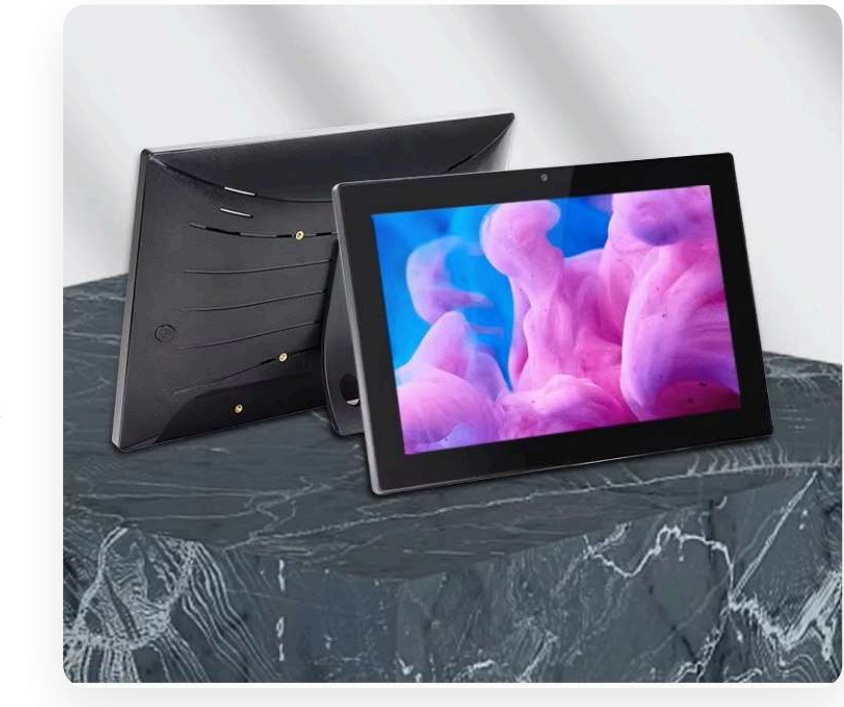
Commercial tablet PCs are portable computing endpoints used for teaching, retail assistance, customer self-service, field data capture, inspections, shared corporate workflows, and task-specific applications. Unlike a personal tablet, a business tablet must survive shared use, policy control, predictable app installation, and a clear lifecycle for charging, storage, repair, and replacement.
Maram Technologies helps organizations select and deploy tablet fleets with the surrounding operating model in mind: who uses the device, which apps matter, whether MDM is required, how offline work should behave, what mounts or cases are needed, and how IT or operations will enroll and support units after rollout. Hardware choice is only one layer; enrollment ownership and support routines decide whether the fleet stays healthy.
Education programs often need classroom durability expectations, charging carts or cabinets, content apps, and admin control. Retail programs may need POS-adjacent apps, inventory tools, customer-facing kiosk modes, or associate productivity devices. Field teams need connectivity assumptions, battery planning, case protection, and apps that work when networks are uneven. Enterprise shared fleets need identity, policy, wipe/reuse processes, and spare pools.
We also connect tablet planning to Maram software where relevant—such as school management workflows, custom business applications, or device-aware operations. When stock Android is not enough, programs can extend into custom launchers and firmware for locked experiences.
A practical tablet program usually includes three documents teams underestimate: an enrollment runbook (who owns MDM, what policies apply, how devices are named), an accessories standard (case, mount, charger, cart rules), and a failure playbook (lost device, cracked screen, app crash, network outage). When those exist before purchase orders go out, pilots convert into fleets with far less friction. When they do not, organizations often discover that “buying tablets” was the easy part and that daily operations become a patchwork of exceptions.
Maram’s role is to help you make those decisions early—selecting a commercial profile that fits the real users, validating critical apps on sample units, and preparing staging guidance so the first hundred devices look and behave like the first ten. That is how education, retail, and enterprise tablet programs stay useful months after the initial unboxing.
Tablet programs work best when the device role is explicit: learner device, associate tool, kiosk surface, or field capture endpoint.
Classroom tablets, lab devices, shared learning carts, and campus programs that need enrollment control and content app readiness.
Associate tablets, floor-walking tools, check-in devices, and customer-facing interactive experiences with kiosk options.
Inspection, service, logistics, and data-capture teams that need portable apps, cases, and realistic offline assumptions.
Hot-desk tablets, visitor devices, meeting-room tools, and departmental shared pools with wipe and re-enrollment routines.
Non-clinical workflows such as registration, wayfinding assistance, or staff forms where policy control matters.
Mounted tablets locked to a single workflow for catalogs, feedback, appointments, or information access.
Match screen size, performance, storage, cameras, and accessories to the actual job—teaching, retail, field, or kiosk.
Plan enrollment, policy packs, app distribution, remote actions, and inventory assumptions around your MDM stack.
Lock devices to approved apps, reduce settings access, and define recovery steps when users exit the intended flow.
Cases, mounts, keyboards, styluses, charging carts, and spare batteries or docks where the environment requires them.
Validate critical applications, browser requirements, camera workflows, and offline behavior before scale purchase.
Define naming, asset tags, spare pools, wipe/reuse, RMA handling, and who owns first-line support at each site.
MDM pairing and enrollment ownership are designed before devices arrive, reducing chaotic manual setup.
Education, retail, and field needs differ. Sizing the profile avoids overpaying for unused features or under-speccing critical ones.
Standard cases, charging plans, and documented apps make helpdesks faster and reduce “mystery tablet” issues.
Shared classrooms and retail floors need accessory and handling plans that personal gadgets rarely include.
Tablets can align with school platforms, custom apps, or managed device programs instead of living as isolated hardware.
Spares, imaging assumptions, and wipe/reuse steps keep fleets usable when units fail or staff change.
Exact models vary by project. Use this table to compare options before standardizing a fleet profile.
| Display & form | Screen size, brightness expectations, orientation, and whether the tablet will be handheld, cart-based, or permanently mounted. |
|---|---|
| Performance & storage | CPU/RAM/storage suited to apps, media, multitasking, and local offline caches without unnecessary overspend. |
| Connectivity | Wi-Fi requirements, optional cellular, Bluetooth accessories, and site network assumptions for enrollment and updates. |
| Sensors & I/O | Cameras, NFC, USB-C roles, audio, and any peripheral needs for scanning, payments, or capture workflows. |
| MDM & identity | Enrollment method, ownership model, policy packs, wipe rules, and who administers the console day to day. |
| Security posture | App allowlists, kiosk locks, update cadence, lost-device process, and data sensitivity of the workflows. |
| Power & accessories | Charging carts, docks, cases, mounts, keyboards, and storage between shifts or class periods. |
| Support lifecycle | Spare pool size, RMA path, asset tagging, and how devices are redeployed between users or locations. |
Clarify users, apps, locations, shared vs assigned ownership, and whether devices are teaching tools, retail tools, field devices, or kiosks.
Choose a tablet profile and accessory set that matches durability, performance, and mounting or charging reality.
Design MDM pairing, policy packs, app catalogs, and enrollment ownership so setup is repeatable.
Pilot with real users: login or kiosk flow, offline cases, charging habits, and first-line support scenarios.
Roll out with asset tags, documentation, spares, and clear handoff to IT or operations.
Track issues, refresh apps/policies, manage replacements, and improve the next wave of devices. Review charging habits, case wear, and app performance each term or quarter so the fleet standard stays realistic.
Many tablet projects stall because hardware arrives before enrollment ownership is clear. Decide early whether devices are company-owned, shared, or personally assigned; which apps are mandatory; whether kiosk mode is required; and who can wipe or reassign a unit. Those answers determine the tablet profile as much as screen size does. Maram helps align procurement, IT, and operations so MDM pairing, staging, and day-two support are part of the same plan.
We do not list fake unit prices. Commercial programs are scoped from the factors below.
Screen size, performance, storage, and optional rugged or commercial features change unit cost significantly.
Cases, mounts, keyboards, styluses, carts, and docks often rival the device cost in classroom or retail programs.
Enrollment design, policy packaging, imaging or staging, and training are project services that should be scoped.
Pilot classrooms or store clusters differ from full-fleet buys. Phased procurement after validation reduces waste.
Locked launchers or firmware customization, when required, are separate from stock commercial tablet supply.
Spare pools, RMA coordination, and ongoing advice should be explicit rather than assumed.
Tell Maram about users, apps, MDM expectations, and sites. We will help shape a device profile and deployment path that operations can support.
Contact Maram